
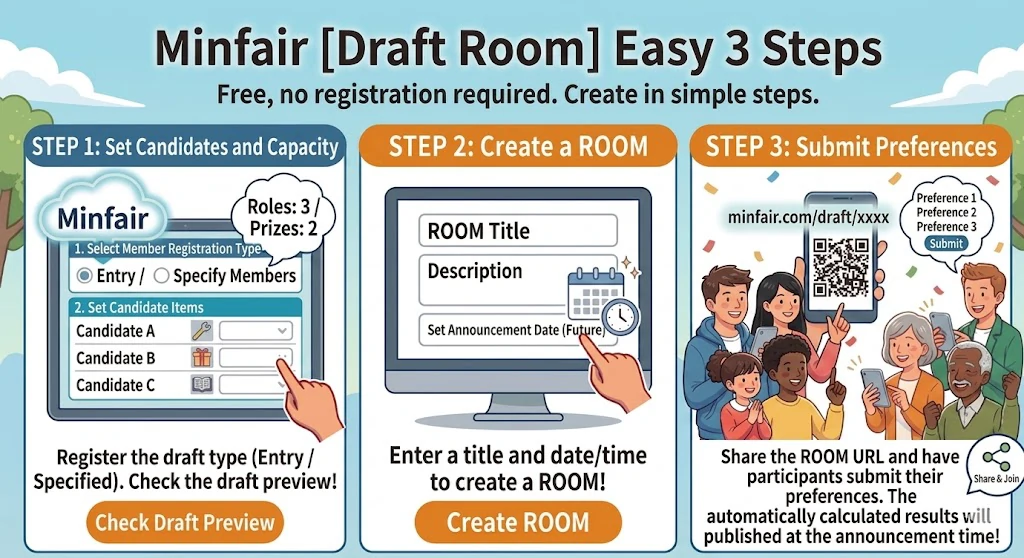
Step 1
Candidates & Capacity
Choose the draft type, enter candidates (roles, prizes, etc.) and their capacities, and verify the assignment image. You can check the image as many times as you like.Fair for Organizers & Participants
Web tool ideal for grouping projects/seminars, distributing event prizes, and assigning PTA roles
Participants submit their preferences like "1st Choice: A, 2nd Choice: B..." for multiple candidates, and the system automatically calculates using a fair drafting system. If applicants exceed capacity, a fair random selection is performed, and those who miss out are automatically re-entered for their next preference. Eliminate unfairness caused by "organizers" or "loudest voices" and maximize everyone's satisfaction.
*This transparent process eliminates manipulation and respects everyone's preferences as much as possible.
A truly fair allocation system with cryptographic strength
The Draft Room employs a cryptographically secure random number generation logic used in modern encrypted communications. Its mathematically proven high unpredictability completely eliminates external guesswork and arbitrary manipulation, providing the highest level of fairness.
Our algorithm calculates the optimal combination to respect everyone's preferences, ensuring the highest overall satisfaction.
No "loudest voice wins" or "first come, first served".
Systematic allocation prevents conflicts and ensures a fair outcome for all.
The tedious process of "tie-breaking selection for duplicates" and "re-adjustment" is fully automated and completed in an instant.
Draft Room adopts an allocation logic similar to a professional sports draft conference.
It eliminates human subjectivity and performs allocation through a highly transparent process where anyone can see that "rules were followed."
This reduces dissatisfaction ("Why did I get this?") and increases group consensus.
Free accounts give you basic tools, while Business Members enjoy ad-free experiences and more.
Free Account
Manage My Rooms
Organize all your rooms in a single dashboard.
Passwordless Access
Manage your rooms instantly without admin passwords.
Visibility Settings
Pre-set your default privacy and tool preferences.
Push Notifications (App only)
Get real-time alerts when your room is finalized.
Business Member
Zero Ads
Share your rooms without any distractions.
Enhanced Security
Set IP restrictions or viewing passwords.
Flexible Reminders
Set multiple email reminders for deadlines.
Boost Efficiency
Room Duplication and CSV Data Export.
You can upgrade to a Business Plan from your dashboard after registering.

 Draft Room